


Last updated on December 2, 2025
AI is changing the way people create and edit videos every day. In Wondershare Filmora V15The Smart Cutout tool gives creators effortless control over what stays in the frame and what disappears. It detects edges and shapes with high accuracy, allowing users to quickly replace or blur backgrounds. With just a few simple steps, anyone can keep every frame clear, focused and visually smooth.
Before AI-powered tools, editing meant tracing each subject by hand frame-by-frame for hours. Each cutout requires patience, precision and near-perfect line control. Even small mistakes can break the outline or disrupt how the shadows and lights match across the frame.
Soft hair, thin fabric and fast speeds make clean masking incredibly challenging. With Fillmore’s AI capabilities, those time-consuming, error-prone steps now take mere moments—making clean, professional results achievable for everyone.
Part 1. What makes Smart Cutout special in Wondershare Filmora V15?
The upgraded Smart Cutout in the Filmora V15 removes or separates subjects with speed and precision. Advanced smudging interactions and edge-processing algorithms better recognize your brushing intent, reduce repeated adjustments, and handle complex edges more cleanly.
Users can choose Easy mode for faster results or Advanced mode for finer control. A new Stroke feature has also been added, offering multiple outline styles that highlight the main subject with one click and follow it dynamically and statically across the frame—keeping every shot balanced, polished, and visually consistent.
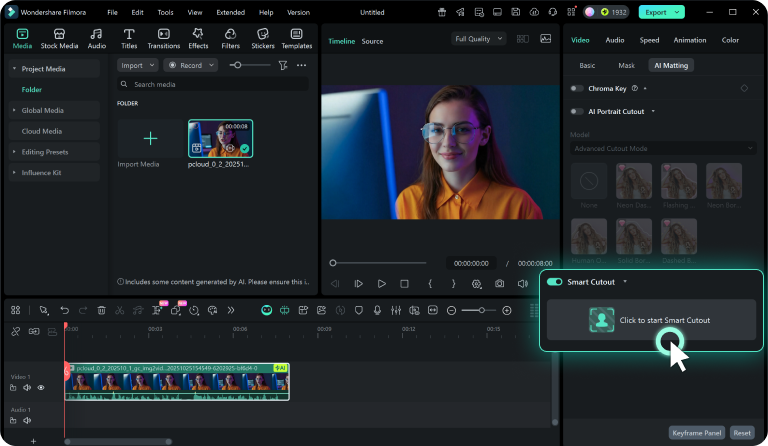
Simple mode
While designed for fast results the time Click once on the limited subject, and the AI automatically detects and captures clean, precise edges—no need to brush back and forth. It’s ideal for short videos, vlogs or quick social media posts. The background fades out smoothly, leaving the subject sharp and well-defined without extra steps or reshoots.
advanced mode
This mode provides better accuracy for complex scenes and close-up subjects. It studies each frame, tracking short hair strands and fabric edges. The tool keeps the motion smooth and the shape constant as the light changes. It’s perfect for portraits, product videos or detail projects where realistic blending is really important.
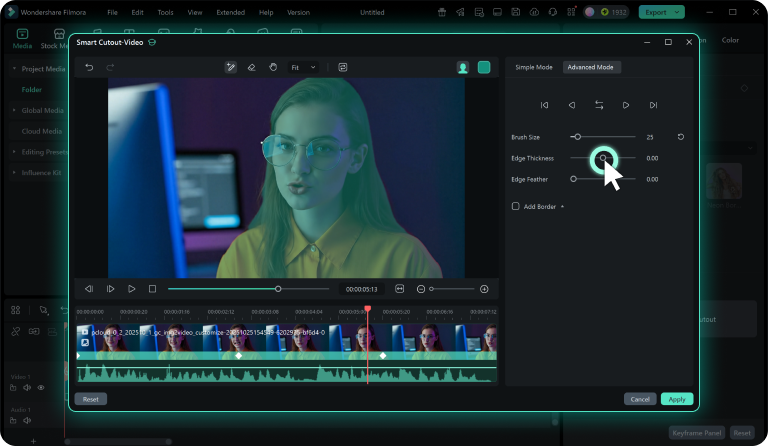
Brush size – easy selection control
The Brush Size slider adjusts how wide the selection tool paints. A large brush speeds up work on broad shapes, while a small brush helps capture angles and fine details. This flexibility makes the outline comfortable and precise.
edge feather
edge feathers Lets you choose between soft and crisp outlines for each clip. Soft borders help the subject blend smoothly into the background, while sharp edges add emphasis to tutorials, product shots, or educational scenes. this balance Cutouts ensure a natural feel on all types of materials.
Edge Thickness – Fine-tuning the finish
Edge thickness Adjusts how dark or thin the outline appears. A thick edge emphasizes the subject, while a thin edge creates a lighter, softer border. Combined with the Edge Feather, these controls create a natural blend and maintain a clean, polished finish throughout the cutout.
Part 2. What does Smart Cutout do after you import footage?
Smart cutout in Filmora V15 makes every edit look natural and cohesive. After identifying your subject and adjusting the edges, the tool blends everything smoothly. It maintains consistency in tone, lighting, and motion throughout the frame—resulting in footage that looks clean, balanced, and enjoyable from start to finish.
Smart cutout keeps your subject sharp and stable even when moving. It preserves fine details such as hair, fabric texture, and soft shadows without breaking edges. When placed on a new background, the subject fits naturally. Every frame looks clean and smooth without jitter or harsh outlines. The tool protects delicate components and maintains edge stability, ensuring a polished appearance throughout the clip.
End of thought
Filmora V15’s Smart Cutout shows how AI can transform editing into pure creativity. It removes blur, refines edges and brings balance to every frame. From clean subject isolation to natural blending, it adds clarity and polish to every scene. For creators looking for smart, simple and powerful editing tools, Wondershare Filmora V15 is an excellent place to start.
About Wondershare:
Wondershare A globally recognized software company founded in 2003, known for innovative solutions for creativity and productivity. Driven by the mission “Creativity Simplified”, Wondershare offers a variety of tools for video editing, including Filmora and SelfyzAI; PDF components for document management; and EdrawMax, EdrawMind for diagramming. With 2 billion growing active users across all products and a presence in more than 200 countries and territories, Wondershare empowers the next generation of creators with intuitive software and trendy creative resources, continuously expanding the possibilities of global creativity.